

Applicant Spreadsheet Preparation
These best practices will help ensure Maya works effectively with your candidate data. By properly labeling fields like first and last names, emails, phone numbers, and resumes, Maya can better personalize each interaction, resulting in higher engagement rates and smoother communication.
A Globe Life representative or your dedicated support team can assist you with this setup, ensuring your leads spreadsheet is prepared for optimal results.
Ensure Proper Field Labeling
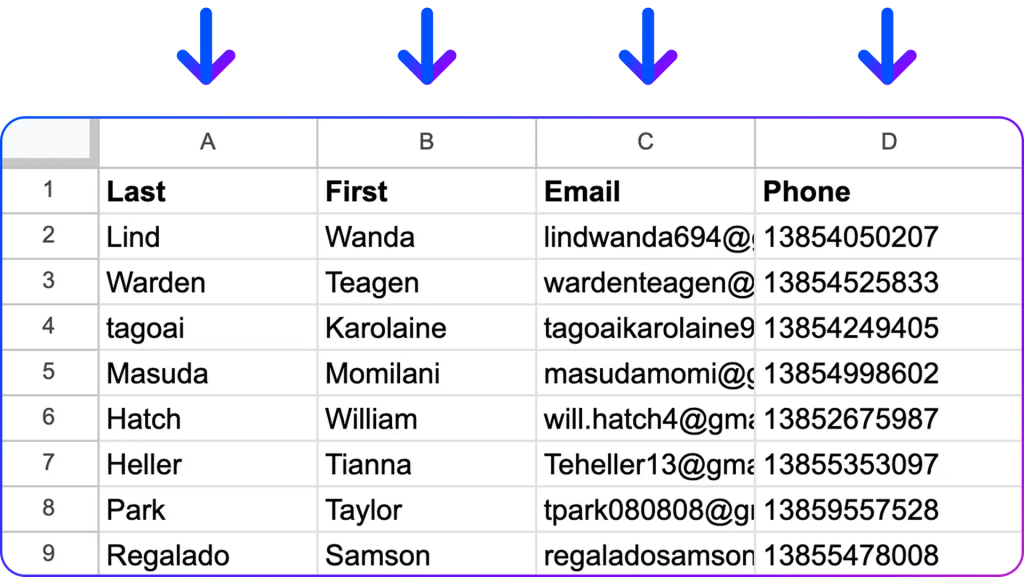
To help Maya recognize and process information correctly, make sure the top row of each column is labeled with the following recommended field names. If you see a familiar example like an email or phone number, you can relabel the top row accordingly:
First Name: If you see values like “Jasmine” or “David,” rename the column header to “First Name”.
Last Name: If you see values like “Smith” or “Nguyen,” relabel the header to “Last Name”.
Email: If you see values like “[email protected]” or “[email protected],” rename the top row to “Email” or “Email_Address”.
Phone Number: If you notice formats like “(555) 123-4567” or “+1 555 123 4567,” label the top row as “Phone” or “Phone_Number”.
Resume (optional): If you see URLs or file paths (e.g., “http://example.com/resume.pdf” or “/documents/resume.pdf”), label this column as “Resume” or “Resume_Link”.
Labeling columns correctly helps Maya identify core information like names, emails, and phone numbers immediately, which improves the accuracy and personalization of candidate interactions.
Format Contact Information Consistently:
Phone Numbers: Use a consistent format (e.g., (555) 123-4567 or +1 555 123 4567) to avoid any parsing errors.
Emails: Ensure emails are valid and accurate by double-checking for typos or missing symbols.
Include Only Priority Information for Improved Focus:
Maya prioritizes First Name, Last Name, Email, and Phone Number for a personalized interaction. Including these fields ensures Maya can accurately identify and communicate with each candidate, leading to higher engagement.
Resumes are valuable for context, allowing Maya to tailor responses based on the candidate’s experience.
Other Fields Are Optional but Useful:
- Fields like Location, Job Title, or Notes are helpful for additional context in conversations but are secondary to core information. Maya can reference these details if provided but will prioritize the main fields for efficiency.
Review and Update Regularly:
- Fields like Location, Job Title, or Notes are helpful for additional context in conversations but are secondary to core information. Maya can reference these details if provided but will prioritize the main fields for efficiency.